

Step 1 Launch Program & Drag in Photos
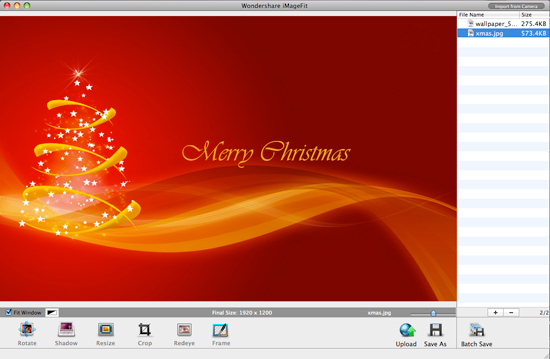
Launch the program and then drag in christmas photos you try to make into iphone wallpaper into the program. Of course, you can drag more than one photo make more wallpaper once.
Step 2 Crop Photo to iPhone Wallpaper Size
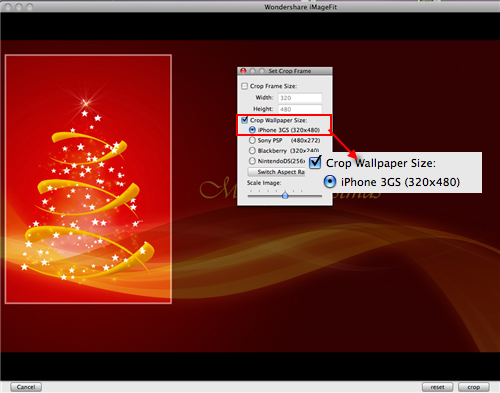
Click Crop button, choose iPhone 3GS wallpaper crop size and crop photo according to the specific frame requested size.
Step 3 Save Your Christmas iPhone Wallpaper
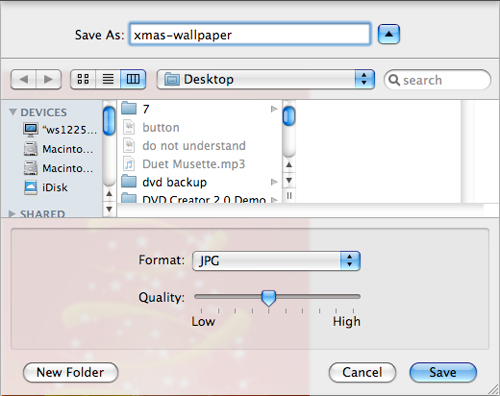
After cropping, click Save As button to save your finished edited christmas iPhone wallpaper. Type in your wallpaper name and choose the photo format you want to save as.
Step 4 Send Wallpaper to iPhone
After saving, you can use iTunes to send this christmas iPhone wallpaper to your iPhone and use it as your new wallpaper. It is easy and simple, try yourself now!

Here you also can get free christmas iPhone wallpaper


 Posts
Posts


No comments:
Post a Comment